
-
Products
Overview Products

-
2D Cutting
-
Tube Cutting
-
3D Cutting
-
Intelligent Welding
-
Intelligent Cutting Head
-
Industrial Automation
-
Industrial Software
-
Combination
-
Combination
BOCHU New Product -
Combination
BOCHU New Product -
BOCHU New Product
-
2D Cutting Head
Tube Cutting Head
3D Cutting Head
Consumables
BOCHU New Product -
Servo
BOCHU New Product -
Industrial 4.0
-
- Support
- About
- Online Store











- Software Download
- Manual
- Video
- Tutorial

TubesT is a 3D tube nesting software designed for CypTube/TubePro laser cutting system. From parts drawing and modification, full type compensation, strategic nesting to report generation, using TubesT will meet and exceed your production needs.
Intelligent Nesting
TubesT supports nesting of parts of various shape all at once with minimum waste.
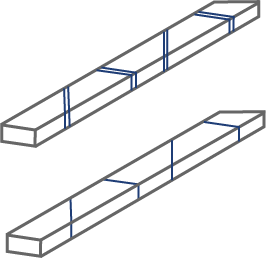
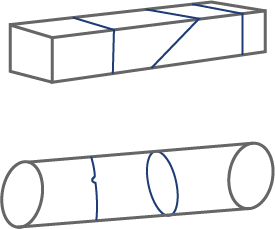
Flexible Common Line
Different parts, regardless of applied compensation, can merge common line toolpath in TubesT to reduce cutting times and minimize waste in production.
Quick Import
Parts or assemblies(IGS format) of multiple shapes can be imported in TubesT in a one-time operation to improve efficiency.

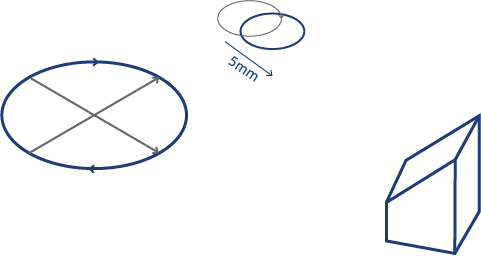
Drawing Modification
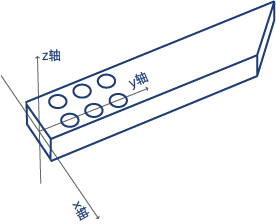
To solve the common problems in tube cutting, like through-hole precision and parts-assemble interference, TubesT developed flexible and easy-to-use functions for user to adjust parts drawing.
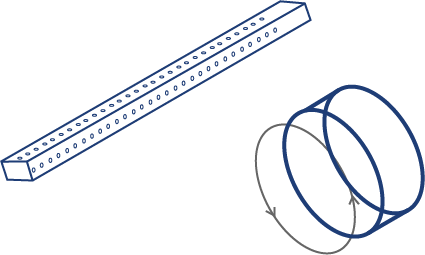
Automatic Sorting
Tube and profiles can finish automatic toolpath sorting by a simple click. For square and round tube, TubesT allows to generate toolpath by tube face sequence or by tube length interval.
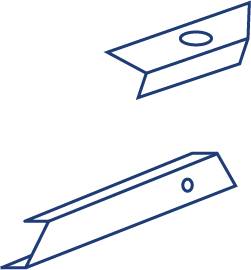
Profiles Production
TubesT supports toolpath generation, modification and common line nest of profiles like L/U/T/H shape to extend production ability of your machine.
Parts Design
TubesT integrates drawing functions of extrude, cut, hole and V-groove etc. , even user with zero CAD experience can get start easily.
Nesting Report
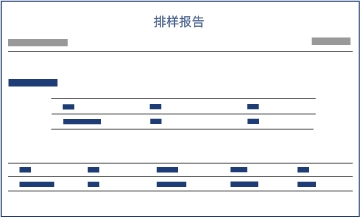
Nesting report of clear data sheet to facilitate operator manage production schedule.
Software Download
TubesT
Other
Update Log
[Note: This version is 64-bit software. Please confirm that your computer's operating system is 64-bit. To use TubesT 26 V2.4, TubePro must be upgraded to version 10.2506.9.0 or later.]
1. Added Part Status Panel
To ensure the safety of part processing, TubesT now provides a Part Status Panel, which allows users to quickly understand the safety status of parts.
2. Upgraded 【Auto Collision-Avoid】
Optimized the processing logic of 【Auto Collision-Avoid】, reducing the result deviations caused by the mutual influence between the two functions 【Optimize H-Beam Toolpath】 and 【Auto Collision-Avoid】.
3. 【Loop Nesting】Now Supports More Joint Types for Various Tubes
Optimized 【Loop Nesting】 and expanded the joint types supported for various tubes.
4. 【Quick Sampling】Now Supports Adding Flange Bevels
For welding scenarios that require splicing, it can directly generate flange bevel toolpaths that meet fillet welding requirements, with no need for manual addition or adjustment, reducing operational complexity and improving sampling efficiency and accuracy.
5. 【Quick Sampling】Now Supports New Tongue Toolpaths
For H-beam T-joint scenarios, it supports more welding requirements such as double-sided fillet welding.
6. 【Optimize H-Beam End Toolpath】Now Supports Processing Hot-Rolled I-Beams
Building on the existing support for H-beams, support for hot-rolled I-beams is now added, reducing operational complexity.
7. Added Support for Importing ACIS 27.0 SAT Files
Added support for importing ACIS 27.0 SAT files exported by SolidWorks 2016 and later versions.
8. Added 【Parameter Backup】
Solves problems such as low efficiency, error-proneness and high communication costs encountered in the process of device migration, multi-machine synchronization, batch delivery and troubleshooting.
9. 【Railing Order Splitting】Added 【Typical-Security Grille】and 【Simple - Security Grille】Styles
Added support for two types of security grilles, with no need for manual drawing or splitting, greatly improving drawing output efficiency and reducing drawing costs, making complex designs much simpler and more efficient.
10. Added Support for Fixed Height Marking on the Inner Side of LC Steel
Added support for fixed height marking on the inner side of angle steel and channel steel. It can automatically recognize double-sided marking toolpaths without manual intervention, improving processing efficiency.
11. 【Auto Nest】Interface Optimization and Upgrade
The 【Auto Nest】interface has been adjusted and upgraded, optimizing the interface layout and user experience.
12. Optimized the Operations of the "Nesting Task Bar"
Optimized the functional layout of the "Nesting Task Bar" so that it clearly displays the tube information under each cross-section, and added 【Sort: By Tube Length】.
13. Optimized the Pop-up Prompt for Failed Part Import
Optimized the pop-up window for failed part import, and added a failure reason prompt, making it convenient for users to quickly troubleshoot problems and improving processing efficiency.
1. Added Part Status Panel
To ensure the safety of part processing, TubesT now provides a Part Status Panel, which allows users to quickly understand the safety status of parts.
2. Upgraded 【Auto Collision-Avoid】
Optimized the processing logic of 【Auto Collision-Avoid】, reducing the result deviations caused by the mutual influence between the two functions 【Optimize H-Beam Toolpath】 and 【Auto Collision-Avoid】.
3. 【Loop Nesting】Now Supports More Joint Types for Various Tubes
Optimized 【Loop Nesting】 and expanded the joint types supported for various tubes.
4. 【Quick Sampling】Now Supports Adding Flange Bevels
For welding scenarios that require splicing, it can directly generate flange bevel toolpaths that meet fillet welding requirements, with no need for manual addition or adjustment, reducing operational complexity and improving sampling efficiency and accuracy.
5. 【Quick Sampling】Now Supports New Tongue Toolpaths
For H-beam T-joint scenarios, it supports more welding requirements such as double-sided fillet welding.
6. 【Optimize H-Beam End Toolpath】Now Supports Processing Hot-Rolled I-Beams
Building on the existing support for H-beams, support for hot-rolled I-beams is now added, reducing operational complexity.
7. Added Support for Importing ACIS 27.0 SAT Files
Added support for importing ACIS 27.0 SAT files exported by SolidWorks 2016 and later versions.
8. Added 【Parameter Backup】
Solves problems such as low efficiency, error-proneness and high communication costs encountered in the process of device migration, multi-machine synchronization, batch delivery and troubleshooting.
9. 【Railing Order Splitting】Added 【Typical-Security Grille】and 【Simple - Security Grille】Styles
Added support for two types of security grilles, with no need for manual drawing or splitting, greatly improving drawing output efficiency and reducing drawing costs, making complex designs much simpler and more efficient.
10. Added Support for Fixed Height Marking on the Inner Side of LC Steel
Added support for fixed height marking on the inner side of angle steel and channel steel. It can automatically recognize double-sided marking toolpaths without manual intervention, improving processing efficiency.
11. 【Auto Nest】Interface Optimization and Upgrade
The 【Auto Nest】interface has been adjusted and upgraded, optimizing the interface layout and user experience.
12. Optimized the Operations of the "Nesting Task Bar"
Optimized the functional layout of the "Nesting Task Bar" so that it clearly displays the tube information under each cross-section, and added 【Sort: By Tube Length】.
13. Optimized the Pop-up Prompt for Failed Part Import
Optimized the pop-up window for failed part import, and added a failure reason prompt, making it convenient for users to quickly troubleshoot problems and improving processing efficiency.
Update Log
[Note: This version is 64-bit software. Please confirm that your computer's operating system is 64-bit. ]
1. Cyclone Cutting
Square tubes introduce a new cutting method - Cyclone Cutting, which increases efficiency by 20%.
2. Welding Shrinkage Compensation
Supports users to manually or batch compensate for the length of parts based on actual processing experience.
3. Railing Order Splitting
No need to draw each individual part of the staircase. After inputting the overall dimensions of the staircase, the entire set of staircase railing parts can be directly split and generated.
4. Loop Nesting Optimization
① Supports generating weld access holes and inner bevels at the joint.
② Supports generating single-sided bevels at the joint.
③ Supports generating weld gap bevels for oblique-cut joints.
④ New support for angle steel and channel steel in oblique-cut joints.
5. Support for marking part numbers at the welding positions in NC1 format files.
1. Cyclone Cutting
Square tubes introduce a new cutting method - Cyclone Cutting, which increases efficiency by 20%.
2. Welding Shrinkage Compensation
Supports users to manually or batch compensate for the length of parts based on actual processing experience.
3. Railing Order Splitting
No need to draw each individual part of the staircase. After inputting the overall dimensions of the staircase, the entire set of staircase railing parts can be directly split and generated.
4. Loop Nesting Optimization
① Supports generating weld access holes and inner bevels at the joint.
② Supports generating single-sided bevels at the joint.
③ Supports generating weld gap bevels for oblique-cut joints.
④ New support for angle steel and channel steel in oblique-cut joints.
5. Support for marking part numbers at the welding positions in NC1 format files.
Update Log
1.End Face Toolpath Optimization Now Supports Recognizing Flange X-Bevels
2.Weld Access Holes Now Support Unclosed Designs
3.CypWizard Plugin Adds Support for Tekla 19.0 Version
4.[One-Click Special Toolpath] Function Now Offers Overcut/Undercut Options
5.Fixed Height Kerf Compensation Adds [Priority Drop] Option
6.Process Differentiation Now Supports Channel Steel, Angle Steel, GB Channel Steel, and GB Angle Steel
2.Weld Access Holes Now Support Unclosed Designs
3.CypWizard Plugin Adds Support for Tekla 19.0 Version
4.[One-Click Special Toolpath] Function Now Offers Overcut/Undercut Options
5.Fixed Height Kerf Compensation Adds [Priority Drop] Option
6.Process Differentiation Now Supports Channel Steel, Angle Steel, GB Channel Steel, and GB Angle Steel
Update Log
1. Optimized Nesting Report Interface
2. New Local Bevel Addition Function
3. New Bevel Function for Cyclic Nesting Joints
4. Enhanced Bevel Recognition
5. Support for Generating GB Standard Angle Steel/Channel Steel
6. Support for Batch Modification of t2t Part Fillet Radii
7. Support for Adjusting First/Last Cut to Straight Cuts in Nesting Results
8. New Grouping and Auto-Constraint Features in Smart Drawing
9. Optimized Weld Hole Toolpath Processing for H-Beams
10. New Over-Bevel Angle Processing Function
11. New Part Assembly Function
12. Optimized Import Recognition Module
2. New Local Bevel Addition Function
3. New Bevel Function for Cyclic Nesting Joints
4. Enhanced Bevel Recognition
5. Support for Generating GB Standard Angle Steel/Channel Steel
6. Support for Batch Modification of t2t Part Fillet Radii
7. Support for Adjusting First/Last Cut to Straight Cuts in Nesting Results
8. New Grouping and Auto-Constraint Features in Smart Drawing
9. Optimized Weld Hole Toolpath Processing for H-Beams
10. New Over-Bevel Angle Processing Function
11. New Part Assembly Function
12. Optimized Import Recognition Module
Update Log
- Available in Русский, 한국인, Português, Nederlands, Čeština, Español, 日本語, Italiano, Français, Deutsch and English.
- Optimize nesting speed, zero-tail nesting, island tool path, and such
- Optimize nesting speed, zero-tail nesting, island tool path, and such
Update Log
1.New Chamfer Function in Smart Drawing
2.New Trim Function in Smart Drawing
3.New Saw-Cut Line Function
4.New End Face Completion Function
5.Support for Splitting Long Slots in the Y-Direction
6.Support for Drawing Nested Holes
7.Optimized Automatic Nesting Speed
8.Support for Checking and Merging Identical Parts
9.Support for Sharp-Angle V-Groove Setting
10.New Curve Splitting with Base Point
11.New Standard Elliptical Tube Cross-Section
12.New Micro-Connection Markers
2.New Trim Function in Smart Drawing
3.New Saw-Cut Line Function
4.New End Face Completion Function
5.Support for Splitting Long Slots in the Y-Direction
6.Support for Drawing Nested Holes
7.Optimized Automatic Nesting Speed
8.Support for Checking and Merging Identical Parts
9.Support for Sharp-Angle V-Groove Setting
10.New Curve Splitting with Base Point
11.New Standard Elliptical Tube Cross-Section
12.New Micro-Connection Markers
Update Log
TubesT_V7.1.35.2 compatible with TubePro_V7.0.15.142 and above.
Major Updates:
1. Changeable skin, brand new user interface;
2.Optimize nest algorithm to pump up tube utilization;
3. Optimize standard shape library to support angle cut-off section;
4. Optimize nest report;
5. Optimize render effect;
6. Add new function of 'Smart Draw' to support draw complex tube assembly;
7. Add ruler in 'tube draw';
8. Add new function in 'tube draw' to draw tube front;
9. Add quick access tool bar and short keys, allow user to define tool bar and short keys;
10. New function of replace long stripe as single line;
11. New function of cross marking;
12.New toolpath for angle/U type steel channel;
13. Allow to save all nesting into one *.zz file;
14. New function of toolpath check;
15. Support to batch set through holes on tube;
16. Support to batch modify 'start point';
17. Support 'auto micro-joint';
18. Support 'scan QR code' import *.ZX file to TubePro.
Major Updates:
1. Changeable skin, brand new user interface;
2.Optimize nest algorithm to pump up tube utilization;
3. Optimize standard shape library to support angle cut-off section;
4. Optimize nest report;
5. Optimize render effect;
6. Add new function of 'Smart Draw' to support draw complex tube assembly;
7. Add ruler in 'tube draw';
8. Add new function in 'tube draw' to draw tube front;
9. Add quick access tool bar and short keys, allow user to define tool bar and short keys;
10. New function of replace long stripe as single line;
11. New function of cross marking;
12.New toolpath for angle/U type steel channel;
13. Allow to save all nesting into one *.zz file;
14. New function of toolpath check;
15. Support to batch set through holes on tube;
16. Support to batch modify 'start point';
17. Support 'auto micro-joint';
18. Support 'scan QR code' import *.ZX file to TubePro.
Update Log
TubesT_V7.1.31.2 compatible with TubePro_V7.0.15.135 and above
Update Log
TubesT_V1.29 compatible with TubePro_V7.0.13.135 and above.

×


Basic Guidelines of TubesT

How to Register and Get a Trial