

-
Products
Overview Products

-
2D Cutting
-
Tube Cutting
-
3D Cutting
-
Intelligent Welding
-
Intelligent Cutting Head
-
Industrial Automation
-
Industrial Software
-
Combination
-
Combination
BOCHU New Product -
Combination
BOCHU New Product -
Controller
BOCHU New Product -
2D Cutting Head
Tube Cutting Head
3D Cutting Head
Consumables
BOCHU New Product -
Servo
BOCHU New Product -
Industrial 4.0
-
- Support
- About
- Online Store













- Software Download
- Manual
- Video
- Tutorial
Click Quick Config, you will see the User Habit Setting window. Go to IGS length unit.

The default setting is to Read length unit, which means the actual dimension of the drawings will be used.
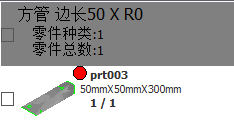
If selecting Ignore length unit, only the number will be read and imported. For example, if the 50mm square tube is wrongly drawn as a 50 inch square tube, select Ignore length unit. After the drawing is imported, TubesT only read 50, and automatically use mm as its unit, so the imported tube unit is 50mm.
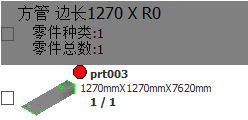
Below are the imported results of 50inch square tubes by selecting Read length unit and Ignore length unit.
Read length unit
Ignore length unit
Click Quick Config, you will see the User Habit Setting window. Go to IGS length unit.
The default setting is to Read length unit, which means the actual dimension of the drawings will be used.
If selecting Ignore length unit, only the number will be read and imported. For example, if the 50mm square tube is wrongly drawn as a 50 inch square tube, select Ignore length unit. After the drawing is imported, TubesT only read 50, and automatically use mm as its unit, so the imported tube unit is 50mm.
Below are the imported results of 50inch square tubes by selecting Read length unit and Ignore length unit.
Read length unit
Ignore length unit

