

-
Products
Overview Products

-
2D Cutting
-
Tube Cutting
-
3D Cutting
-
Intelligent Welding
-
Intelligent Cutting Head
-
Industrial Automation
-
Industrial Software
-
Combination
-
Combination
BOCHU New Product -
Combination
BOCHU New Product -
Controller
BOCHU New Product -
2D Cutting Head
Tube Cutting Head
3D Cutting Head
Consumables
BOCHU New Product -
Servo
BOCHU New Product -
Industrial 4.0
-
- Support
- About
- Online Store














- Software Download
- Manual
- Video
- Tutorial
Ⅰ. Overview
TubesT provides multiple sorting methods to optimize cutting sequences.
From the Sort dropdown menu, you can select between two primary modes: Auto Sort and Manual Sort.
Ⅱ. Auto Sort
Click Sort or select Auto Sort from the Sort dropdown menu to access the function window.

★ Notice: For profile section cutting machines, use Slag-free Sort; for tube cutting machines, choose either Sort by Y Axis or Sort by Face.
1. Sort by Y Axis (Commonly Used)
The Y-axis represents the tube's longitudinal direction. Parts are sorted from smaller to larger Y coordinates. If two graphics start at the same Y coordinate, the software arranges them in a clockwise order.
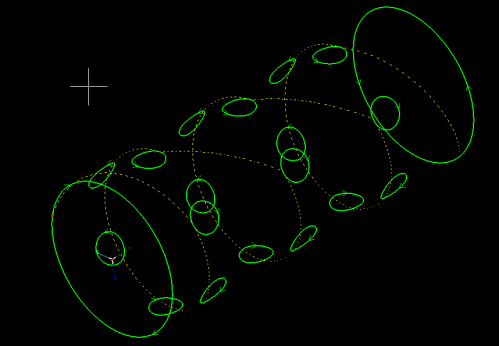
(Yellow lines indicate the travel paths)
Optimize B-axis rotation (Available only in Sort by Y Axis; applicable to absolute encoders)
When the B-axis servo motor uses an absolute encoder, continuous rotation in the same direction may cause the encoder feedback value to overflow, triggering a system alarm and interrupting cutting. This option can ensure that the B-axis operates within a limited rotational range if
Cutting lines switches between clockwise and counterclockwise directions.
Travel between tube holes also moves alternately in a clockwise and counterclockwise direction.
Notice: Optimize B-axis rotation has been removed since TubesT 25V3. This option is enabled by default when using Sort by Y Axis.

2. Sort by Face (Optimal for Large Quantities of Similar-Sized, Well-Aligned Parts)
This strategy groups geometries located on the same tube face and sorts them with a combined rule, from smaller to larger Y coordinates, and in a clockwise order. After completing one face, the tube automatically rotates to process the next, optimizing cutting paths and minimizing rotation times.
A Segmentation length needs to be defined to divide the tube into sections. Then, sorting is applied to each segment individually, instead of processing one entire face before switching to another.

Divide the square tubes into segments (e.g., Segment A and Segment B)
The processing sequence: ① Segment A Upper Face → ② Segment A Lower Face → ③ Segment B Lower Face → ④ Segment B Upper Face
Avoid Slag Sorting (Exclusive to TubesT-H for Profile Section Cutting)
During flange cutting on profile section cutting machines, the cutting head activates the laser horizontally, causing molten slag to splash onto the web surface. The slag spreads in a fan-shaped pattern, covering a certain area along the Y-axis, depending on the machining technique parameters.
Continuing to cut on the web can cause frequent nozzle contact with slag, resulting in unstable production. To prevent this, TubesT-H introduces Slag-free Sort.

3. Parameter Settings
Apply to all nesting: When enabled, each sorting operation applies to all nesting results simultaneously.
Allow to change cutoff start point: When enabled, the software can modify the start point of the cutoff lines, which in some cases can reduce travel movement and optimize cutting efficiency.
Holes around cutoff section first:
When disabled, holes are cut after the cutoff section.
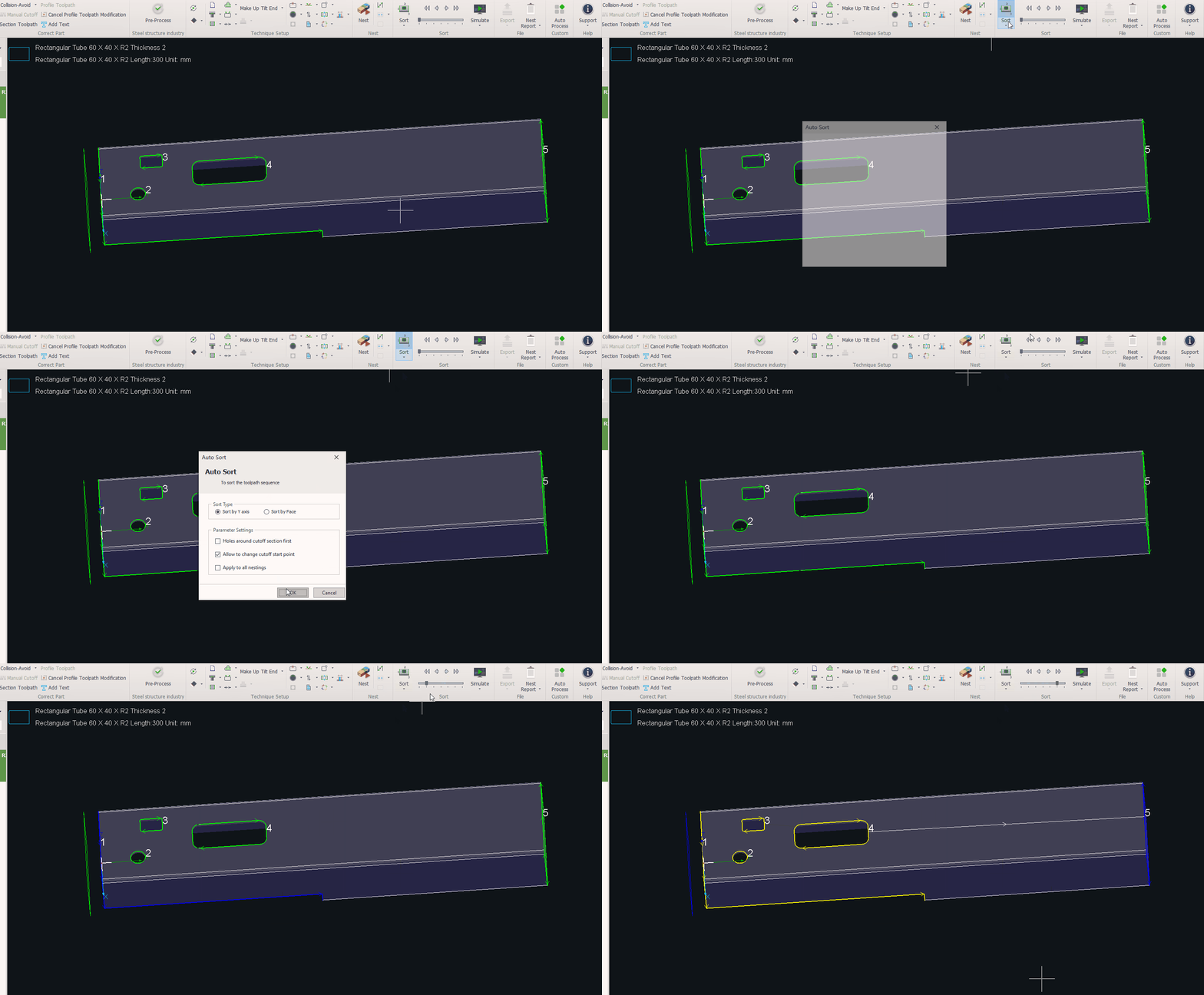
When enabled, holes are cut first, followed by the cutoff section.
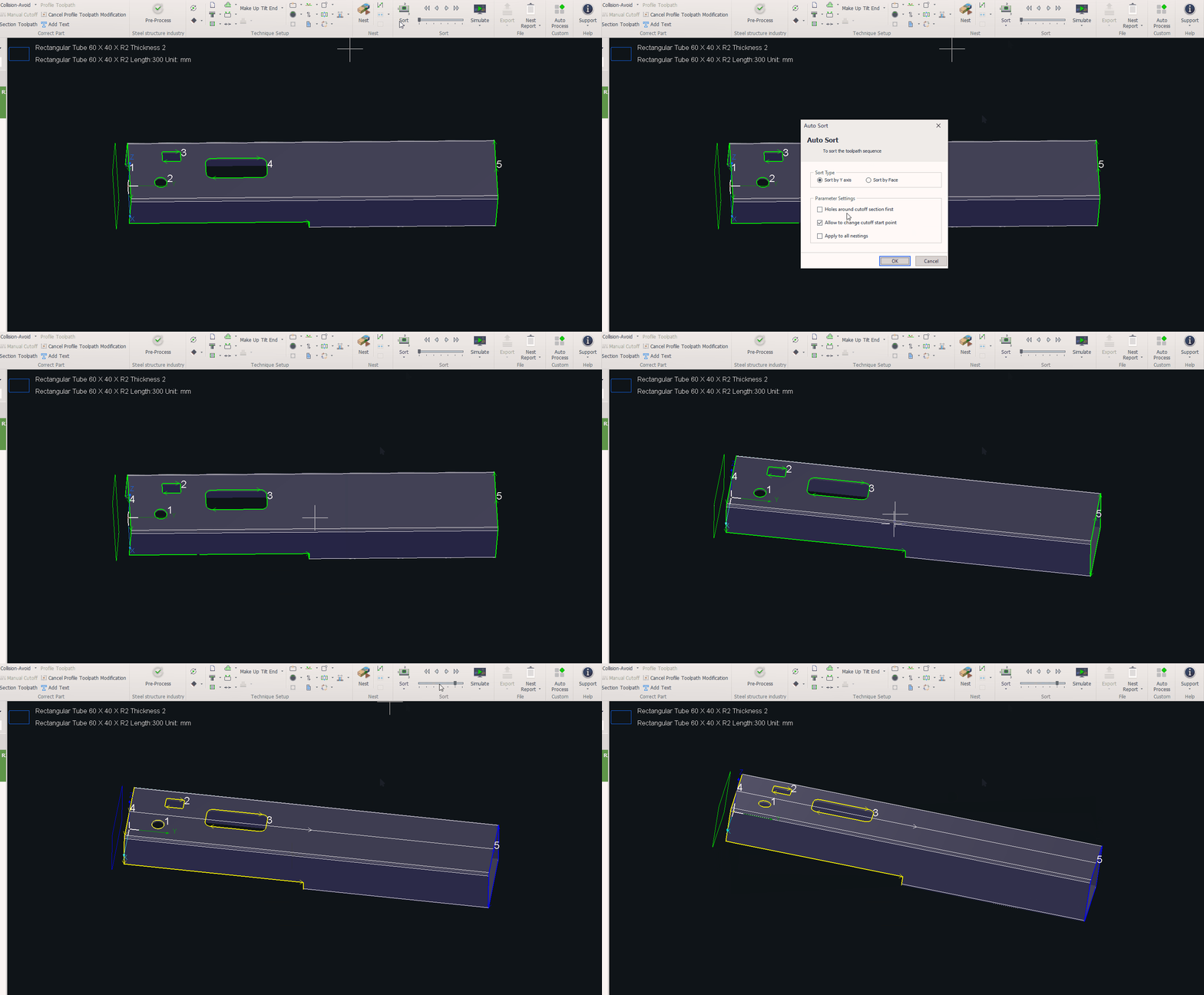
This option prevents issues such as jamming or unstable clamps, as scrap may lift when the tube contracts after cutting.
Ⅲ. Manual Sort
1.Manual Sort
Manual Sort allows customization of the cutting sequence. You can modify the start point of each toolpath.
For detailed instructions, please refer to TubesT – Manual Sort.

2.Flat Manual Sort
Flat Manual Sort, an extension of Manual Sort, unfolds 3D graphics into 2D space for easier selection and sorting.
For detailed instructions, please refer to TubesT – Flat Manual Sort.

IV. FAQs
1.How to fine-tune the toolpath sequence?
Use the arrow buttons above the progress bar. Select a toolpath, then click the arrow.
Arrows in red move the selected toolpath forward or backward by one step.
Arrows in blue move the selected toolpath directly to the beginning or the end of the sequence.

Ⅰ. Overview
TubesT provides multiple sorting methods to optimize cutting sequences.
From the Sort dropdown menu, you can select between two primary modes: Auto Sort and Manual Sort.
Ⅱ. Auto Sort
Click Sort or select Auto Sort from the Sort dropdown menu to access the function window.
★ Notice: For profile section cutting machines, use Slag-free Sort; for tube cutting machines, choose either Sort by Y Axis or Sort by Face.
1. Sort by Y Axis (Commonly Used)
The Y-axis represents the tube's longitudinal direction. Parts are sorted from smaller to larger Y coordinates. If two graphics start at the same Y coordinate, the software arranges them in a clockwise order.
(Yellow lines indicate the travel paths)
Optimize B-axis rotation (Available only in Sort by Y Axis; applicable to absolute encoders)
When the B-axis servo motor uses an absolute encoder, continuous rotation in the same direction may cause the encoder feedback value to overflow, triggering a system alarm and interrupting cutting. This option can ensure that the B-axis operates within a limited rotational range if
Cutting lines switches between clockwise and counterclockwise directions.
Travel between tube holes also moves alternately in a clockwise and counterclockwise direction.
Notice: Optimize B-axis rotation has been removed since TubesT 25V3. This option is enabled by default when using Sort by Y Axis.
2. Sort by Face (Optimal for Large Quantities of Similar-Sized, Well-Aligned Parts)
This strategy groups geometries located on the same tube face and sorts them with a combined rule, from smaller to larger Y coordinates, and in a clockwise order. After completing one face, the tube automatically rotates to process the next, optimizing cutting paths and minimizing rotation times.
A Segmentation length needs to be defined to divide the tube into sections. Then, sorting is applied to each segment individually, instead of processing one entire face before switching to another.
Divide the square tubes into segments (e.g., Segment A and Segment B)
The processing sequence: ① Segment A Upper Face → ② Segment A Lower Face → ③ Segment B Lower Face → ④ Segment B Upper Face
Avoid Slag Sorting (Exclusive to TubesT-H for Profile Section Cutting)
During flange cutting on profile section cutting machines, the cutting head activates the laser horizontally, causing molten slag to splash onto the web surface. The slag spreads in a fan-shaped pattern, covering a certain area along the Y-axis, depending on the machining technique parameters.
Continuing to cut on the web can cause frequent nozzle contact with slag, resulting in unstable production. To prevent this, TubesT-H introduces Slag-free Sort.
3. Parameter Settings
Apply to all nesting: When enabled, each sorting operation applies to all nesting results simultaneously.
Allow to change cutoff start point: When enabled, the software can modify the start point of the cutoff lines, which in some cases can reduce travel movement and optimize cutting efficiency.
Holes around cutoff section first:
When disabled, holes are cut after the cutoff section.
When enabled, holes are cut first, followed by the cutoff section.
This option prevents issues such as jamming or unstable clamps, as scrap may lift when the tube contracts after cutting.
Ⅲ. Manual Sort
1.Manual Sort
Manual Sort allows customization of the cutting sequence. You can modify the start point of each toolpath.
For detailed instructions, please refer to TubesT – Manual Sort.
2.Flat Manual Sort
Flat Manual Sort, an extension of Manual Sort, unfolds 3D graphics into 2D space for easier selection and sorting.
For detailed instructions, please refer to TubesT – Flat Manual Sort.
IV. FAQs
1.How to fine-tune the toolpath sequence?
Use the arrow buttons above the progress bar. Select a toolpath, then click the arrow.
Arrows in red move the selected toolpath forward or backward by one step.
Arrows in blue move the selected toolpath directly to the beginning or the end of the sequence.

