

-
Products
Overview Products

-
2D Cutting
-
Tube Cutting
-
3D Cutting
-
Intelligent Welding
-
Intelligent Cutting Head
-
Industrial Automation
-
Industrial Software
-
Combination
-
Combination
BOCHU New Product -
Combination
BOCHU New Product -
Controller
BOCHU New Product -
2D Cutting Head
Tube Cutting Head
3D Cutting Head
Consumables
BOCHU New Product -
Servo
BOCHU New Product -
Industrial 4.0
-
- Support
- About
- Online Store














- Software Download
- Manual
- Video
- Tutorial
Ⅰ. Introduction
If you want to distinguish Mark and Cut layer respectively when designing the parts, it is possible to set the graphics for Mark as Not Cut Through, then TubesT is capable to distinguish different layers automatically via 【Layer Mapping】 in Import interface.
II. Usage
1. Permissions-related:
From version 1.39 onwards, SAT format (exported from version 16.0) supports recognition of marking layers, i.e. 【Layer Mapping】.
From version 1.57 onwards, SAT (exported from versions 16-22.0) and STEP formats support recognition of marking layers; IGS format currently does not support marking recognition.
Note: STEP format can also recognise double-sided marking on I-beam flanges.
To utilise these features, first verify your software version. Should you require an upgrade, please click here to update your nesting software.
2. Operational Procedure:
When drafting within third-party software, ensure marking holes are not fully cut through.
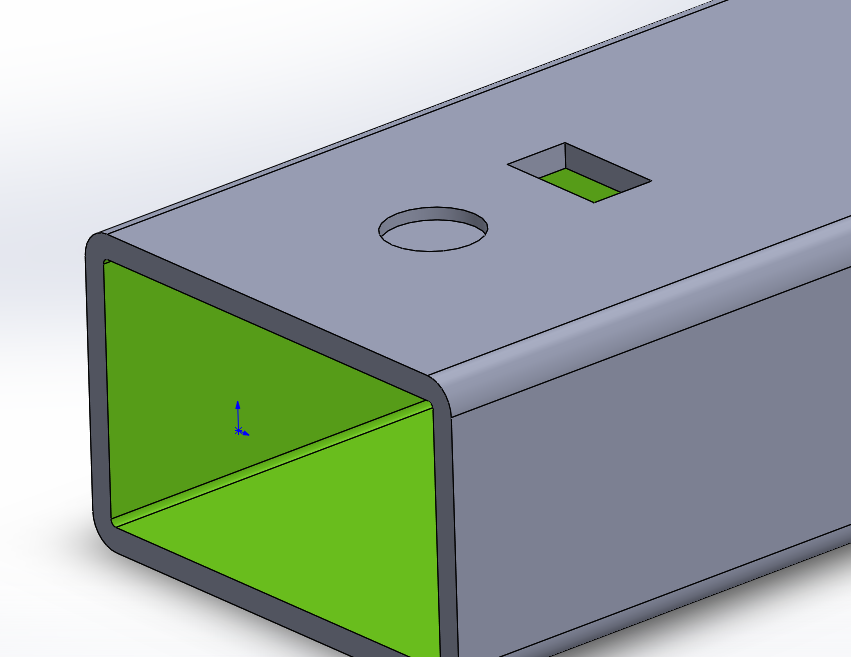
For instance, in the illustration below, the square hole is clearly fully cut through, whereas the circular hole remains partially intact
(e.g., with a 2mm wall thickness, the circular hole's stretch cut only removes 1mm).
When importing files to TubesT via 【Import from Files】, enable 【Layer Mapping】.

Upon import, incomplete cut-out graphics are automatically assigned to a different layer.
III. FAQS
1.How to modify the SAT export version?

2.How to alter the colour of marking layers?
Refer to the 【Technique Assign】.
Ⅰ. Introduction
If you want to distinguish Mark and Cut layer respectively when designing the parts, it is possible to set the graphics for Mark as Not Cut Through, then TubesT is capable to distinguish different layers automatically via 【Layer Mapping】 in Import interface.
II. Usage
1. Permissions-related:
From version 1.39 onwards, SAT format (exported from version 16.0) supports recognition of marking layers, i.e. 【Layer Mapping】.
From version 1.57 onwards, SAT (exported from versions 16-22.0) and STEP formats support recognition of marking layers; IGS format currently does not support marking recognition.
Note: STEP format can also recognise double-sided marking on I-beam flanges.
To utilise these features, first verify your software version. Should you require an upgrade, please click here to update your nesting software.
2. Operational Procedure:
When drafting within third-party software, ensure marking holes are not fully cut through.
For instance, in the illustration below, the square hole is clearly fully cut through, whereas the circular hole remains partially intact
(e.g., with a 2mm wall thickness, the circular hole's stretch cut only removes 1mm).
When importing files to TubesT via 【Import from Files】, enable 【Layer Mapping】.
Upon import, incomplete cut-out graphics are automatically assigned to a different layer.
III. FAQS
1.How to modify the SAT export version?
2.How to alter the colour of marking layers?
Refer to the 【Technique Assign】.

