

-
Products
Overview Products

-
2D Cutting
-
Tube Cutting
-
3D Cutting
-
Intelligent Welding
-
Intelligent Cutting Head
-
Industrial Automation
-
Industrial Software
-
Combination
-
Combination
BOCHU New Product -
Combination
BOCHU New Product -
BOCHU New Product
-
2D Cutting Head
Tube Cutting Head
3D Cutting Head
Consumables
BOCHU New Product -
Servo
BOCHU New Product -
Industrial 4.0
-
- Support
- About
- Online Store







.png)






- Software Download
- Manual
- Video
- Tutorial
Time Estimate
Preconditions
- Install TubePro in the PC which has TubesT, the version should be 7.1.15.135 or later.
- To keep a relative precise estimate result, please make sure the configurations(including travel speed, acceleration and so on) is corresponding to that on your machine.
Application
- When you get the nesting results,

Click Time Estimate in the drop down menu of Report.

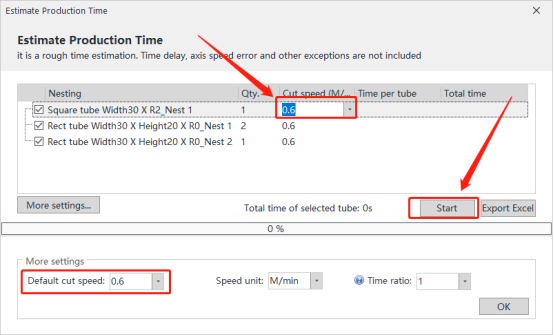
- Input Cutting Speed according to actual situation, click Start to get the result.
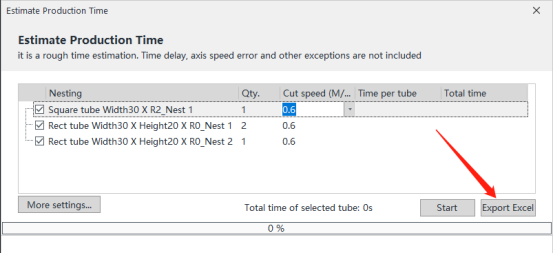
- Click Export Excel button, then TubesT can generate an Excel file with Estimate Results.
Notes
- If you want to change Speed Unit, please click More Settings to change it.
- You can set a Default Cut Speed for all nesting results by Default Speed, More Setttings.

- Time Ratio defaulted is 1, it is allowed to be changed according to your experience. For example, the first time estimated is 10 mins, it will be 20 mins when you change Time Ratio from 1 to 2.
Time Estimate
11642view
Preconditions
- Install TubePro in the PC which has TubesT, the version should be 7.1.15.135 or later.
- To keep a relative precise estimate result, please make sure the configurations(including travel speed, acceleration and so on) is corresponding to that on your machine.
Application
- When you get the nesting results,
Click Time Estimate in the drop down menu of Report.
- Input Cutting Speed according to actual situation, click Start to get the result.
- Click Export Excel button, then TubesT can generate an Excel file with Estimate Results.
Notes
- If you want to change Speed Unit, please click More Settings to change it.
- You can set a Default Cut Speed for all nesting results by Default Speed, More Setttings.
- Time Ratio defaulted is 1, it is allowed to be changed according to your experience. For example, the first time estimated is 10 mins, it will be 20 mins when you change Time Ratio from 1 to 2.

