

-
Products
Overview Products

-
2D Cutting
-
Tube Cutting
-
3D Cutting
-
Intelligent Welding
-
Intelligent Cutting Head
-
Industrial Automation
-
Industrial Software
-
Combination
-
Combination
BOCHU New Product -
Combination
BOCHU New Product -
Controller
BOCHU New Product -
2D Cutting Head
Tube Cutting Head
3D Cutting Head
Consumables
BOCHU New Product -
Servo
BOCHU New Product -
Industrial 4.0
-
- Support
- About
- Online Store














- Software Download
- Manual
- Video
- Tutorial
Sometimes, there will be a little error of the sections dimension because of poor precision when you import the drawings in TubesT, causing that the parts with same dimension originally cannot be nested on same tubes.
For example, these parts below have same radius originally, but they are sorted as two.

Solution
Select these two parts and right click the mouse, choose Force Merge Section, then the sections with little difference will be merged into one.
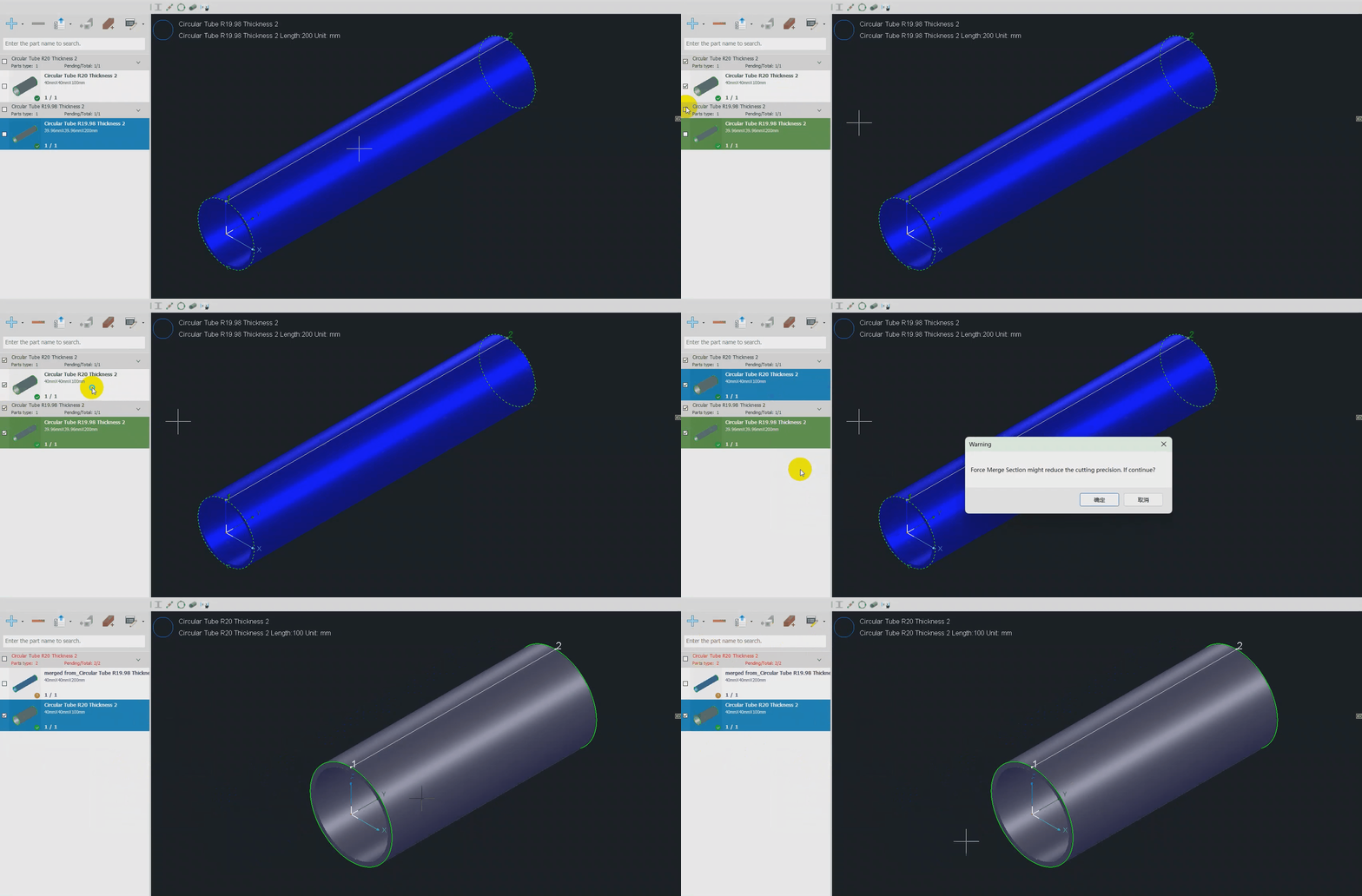
The Profile merge precision can be set in User Settings as shown below:

Profile merge precision will be 1% by default.
Note:
- If the dimension of parts section changes too much after Force Merge Section, there may be something wrong in cutting path, so please check the cutting path after this operation carefully.
- The Force Merge Section function supports merging thickness or different R angles. When merging thickness, TubesT will unify the thickness of all parts to match the thickness of the topmost part in the part list (i.e., the part imported first).

- But different with Dimension Tolerance, the parts merged will not have a new standard section, but the one with largest dimension.
Sometimes, there will be a little error of the sections dimension because of poor precision when you import the drawings in TubesT, causing that the parts with same dimension originally cannot be nested on same tubes.
For example, these parts below have same radius originally, but they are sorted as two.
Solution
Select these two parts and right click the mouse, choose Force Merge Section, then the sections with little difference will be merged into one.
The Profile merge precision can be set in User Settings as shown below:
Profile merge precision will be 1% by default.
Note:
- If the dimension of parts section changes too much after Force Merge Section, there may be something wrong in cutting path, so please check the cutting path after this operation carefully.
- The Force Merge Section function supports merging thickness or different R angles. When merging thickness, TubesT will unify the thickness of all parts to match the thickness of the topmost part in the part list (i.e., the part imported first).
- But different with Dimension Tolerance, the parts merged will not have a new standard section, but the one with largest dimension.

