

-
Products
Overview Products

-
2D Cutting
-
Tube Cutting
-
3D Cutting
-
Intelligent Welding
-
Intelligent Cutting Head
-
Industrial Automation
-
Industrial Software
-
Combination
-
Combination
BOCHU New Product -
Combination
BOCHU New Product -
Controller
BOCHU New Product -
2D Cutting Head
Tube Cutting Head
3D Cutting Head
Consumables
BOCHU New Product -
Servo
BOCHU New Product -
Industrial 4.0
-
- Support
- About
- Online Store















- Software Download
- Manual
- Tutorial
- CloudNest
Function Background
Operation Methods and Notes
-
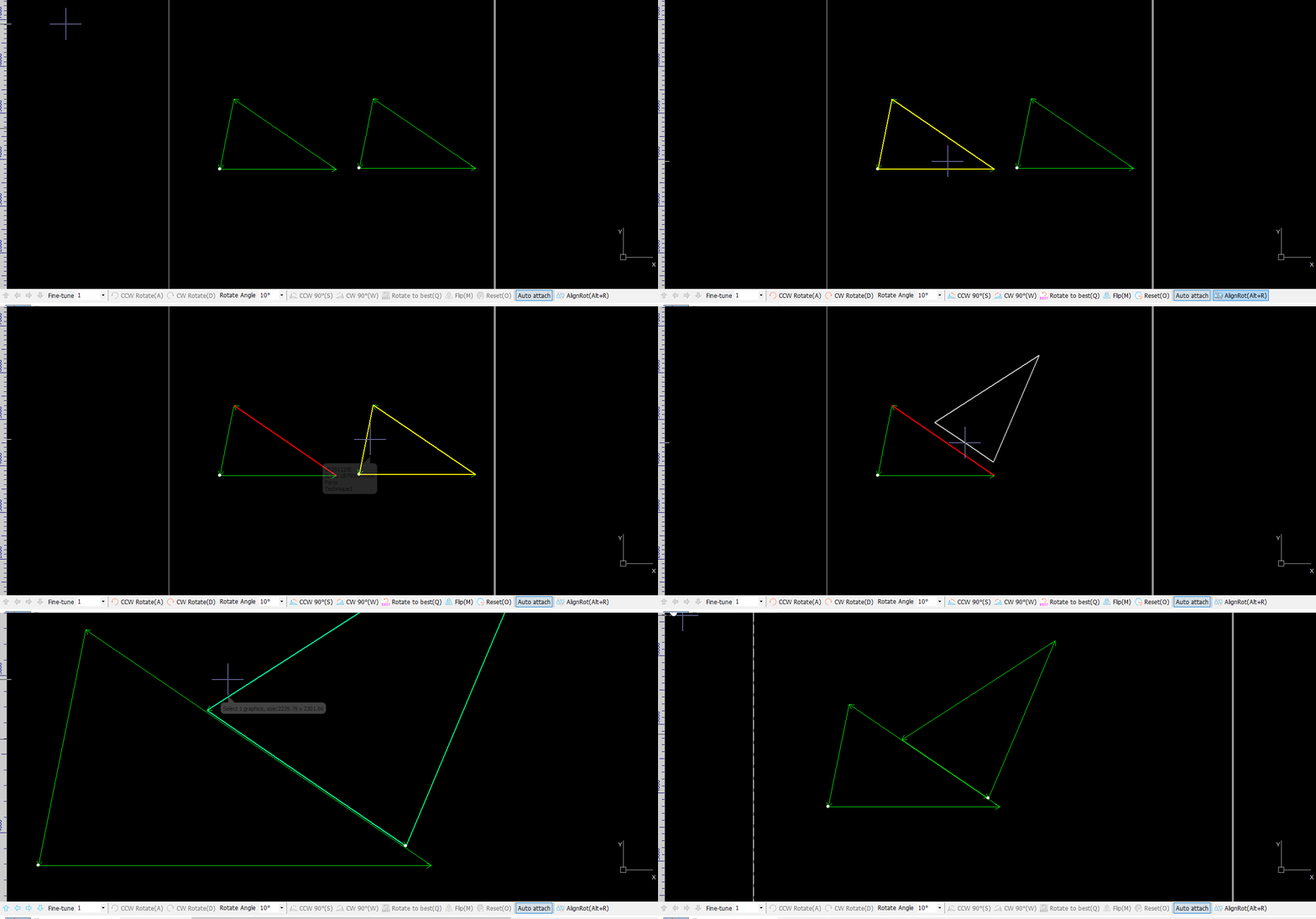
Left-click the edge of the part A that needs to be aligned.
-
Left-click the edge of the part B that you want to rotate. CypNest will automatically calculate the angle and rotate part B to make the two edges parallel, aligning part B with part A.


-
The shortcut key is "ALT+R".
-
The "nearest principle" is used when selecting part edges. You do not necessarily need to click directly on the part edge. Click once on the part, and CypNest will select the edge with the "shortest vertical distance".
Function Background
Operation Methods and Notes
-
Left-click the edge of the part A that needs to be aligned.
-
Left-click the edge of the part B that you want to rotate. CypNest will automatically calculate the angle and rotate part B to make the two edges parallel, aligning part B with part A.
-
The shortcut key is "ALT+R".
-
The "nearest principle" is used when selecting part edges. You do not necessarily need to click directly on the part edge. Click once on the part, and CypNest will select the edge with the "shortest vertical distance".

